Digital copies
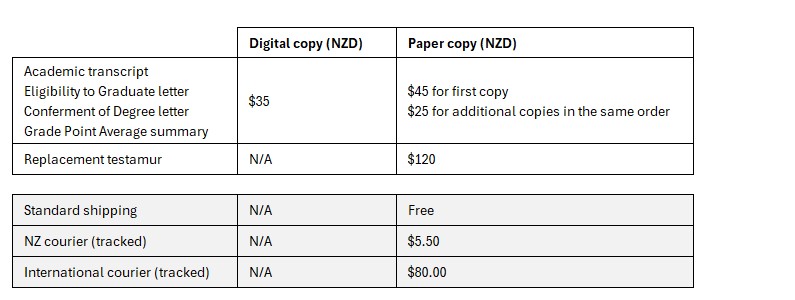
Digital copies are uploaded to My eQuals and can be shared as often as you need using the 'share' function in My eQuals. Only one copy of each digital document can be uploaded at any given time. Do not order more than one copy of a digital transcript or letter.
Digital copies will not be sent by email to you or a third party. If you wish to share a digital document with a prospective employer or another university, you must use the 'share' function in My eQuals.
My eQuals
Once we have processed your order and your documents are released in My eQuals, a notification will be sent to your permanent personal email address, not your student (uclive) email address. This email will include instructions and a link for accessing your documents.
When accessing your My eQuals account, you must use the same email address to which the notification was sent.
If you are expecting a document and have not received the notification, check your spam/junk email folders for an email from My eQuals.
Not sure if you have documents in My eQuals - contact transcript@canterbury.ac.nz.
UC provides digital documentation as a signatory of the Groningen Declaration.
Paper copies
If you order a paper copy of your academic transcript, official letters, or a replacement testamur, these will be posted free of charge unless a courier is required, in which case an additional fee will be charged. Paper copies will be posted to the address you provide in the order form.
Couriered documents cannot be delivered to a PO Box; please provide a physical delivery address and include a phone number in your order details.
Paper copies cannot be collected from the University once the order has been processed.
If you would like a paper copy to be posted to a third party, you must email transcript@canterbury.ac.nz with your authorisation, clearly stating:
- your full name
- your student ID number
- the name of the person to whom the document(s) should be posted
- the reason why you require the document(s) to be posted to this person